
Can you pull a report on your total inventory value across every warehouse in under two minutes right now? If you are currently toggling between four different spreadsheets and a legacy system that feels like it belongs in the nineties, you already know the problem. The manual way of doing things is no longer working. You are considering Acumatica erp to fix that gap, but the biggest question remains: how long will this actually take before your life gets easier?
ERP Implementation Timelines and Project Durations
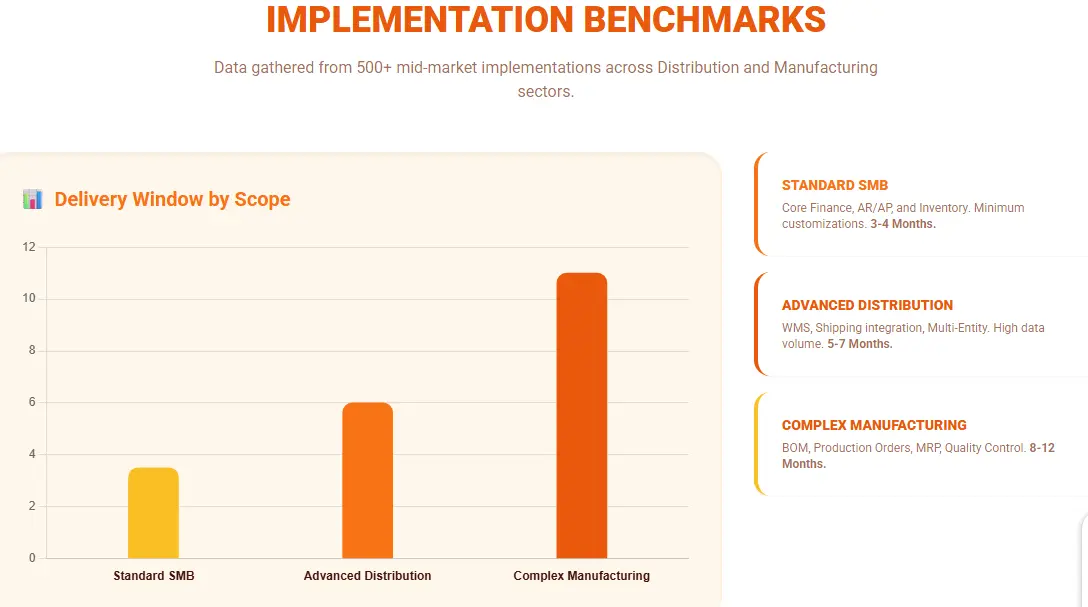
Estimating the timeline for a digital transformation project requires analyzing operational complexity rather than just software features. An unrealistic roadmap is the primary cause of budget overruns. While marketing materials often promise rapid deployment, the ERP implementation lifecycle follows distinct phases that dictate the actual schedule.
Accelerated Deployment (90 Days)
- A three-month timeline is achievable only under strict conditions known as an "Out-of-the-Box" strategy. This approach relies on configuration rather than customization.
- The Prerequisite: This target works for Small to Mid-market businesses (SMBs) willing to adapt their workflows to the software’s standard best practices.
- The Resourcing: Success requires your internal Subject Matter Experts (SMEs) to dedicate approximately 15 hours per week to data migration and User Acceptance Testing (UAT).
- The Trade-off: Speed requires discipline. By strictly limiting code changes and focusing on standard operating procedures (SOPs), you minimize the testing phase and accelerate the go-live date.
Complex Enterprise Rollouts (6 to 12 Months)
For organizations with global operations, multi-entity accounting requirements, or intricate supply chain management needs, the timeline naturally extends.
The Complexity Factor: Projects exceeding six months typically involve extensive API integrations with legacy systems, complex manufacturing routes, or multi-currency consolidation.
The Process: This duration allows for a deep-dive Gap Analysis, custom solution architecture, and phased global rollouts. Industry data suggests that companies with over 500 users must allocate at least 30% of the timeline specifically for change management and training to ensure cross-departmental alignment.
The Hypercare Phase: Managing the "Productivity Dip"
- The project does not conclude at "Go-Live." Professional roadmaps include a Post-Implementation Support period, often called "Hypercare," typically lasting 2-6 weeks with intensive monitoring, weekly department calls, and transaction reviews to build user habits.
- The J-Curve Effect: It is operationally normal to experience a temporary dip in efficiency for 30 to 90 days after launch. This is the J-Curve of productivity.
- Stabilization: During this window, the focus shifts from development to user adoption and system tuning. Teams must build muscle memory for the new interface. Budgeting for this stabilization phase is critical. It bridges the gap between technical installation and actual ROI realization.
Company Size (Employees) | Total Timeline | Key Risks & Mitigations |
<50 (Standard) | 90 days | Data quality: Audit 80% pre-Phase 3 |
50-500 | 4-6 months | Scope creep: Lock requirements post-Phase 2 |
500+ (Enterprise) | 6-12 months | Integration delays: Parallel testing from Phase 4 |
Core Implementation Phases
Getting Acumatica running follows a specific path. If you skip a step in the Acumatica implementation timeline to save time, you usually end up paying for it later in errors and frustration.
Phase 1: Planning and Team Assembly
This is where you decide who is in charge. You need a project manager from your side who has the authority to make decisions. Without a clear leader, the project will stall every time a process question comes up.
Phase 2: Process Discovery and Design
We look at how you work now and how you want to work later. We ask questions like: how do you handle a return? How does an order move from the website to the warehouse? If you cannot answer these questions clearly, the software cannot help you yet.
Phase 3: Data Migration Strategy
This is often the hardest part. You have years of data in old systems. Some of it is likely messy or duplicated. This phase involves deciding what to bring over and what to leave behind, including data cleansing, validation, and mapping to Acumatica formats using tools like ETL or APIs. Moving bad data into a new system is like moving trash into a new house.
Phase 4: System Configuration and Localization
Now we set up the actual Acumatica environment. This involves turning on the right modules and setting up your chart of accounts. We make sure the system follows the rules of your specific region and industry.
Phase 5: Training and User Validation
Your team needs to use the system in a test environment. This is where we find out if the design actually works for the people doing the daily tasks, through UAT scripts and pass rates over 90%. If they cannot complete a test order, we go back to the configuration phase.
Phase 6: Deployment and Go Live
This is the big moment. We migrate the final balances and your team starts using the live system for real transactions, often via phased rollout to minimize disruptions. It is a high energy period that requires your implementation partner to be on standby for immediate support.
Phase 7: Optimization and Feedback
After a few weeks of use, you will find things you want to tweak. Maybe a screen needs an extra field or a report needs a different layout. This phase turns the system from something that works into something that truly helps your business grow.
Phase | Key Activities | Typical Duration | Egypt Add-On | Cost Range (USD) |
1. Planning and Team Assembly | Decide leadership with project manager authority | 2-4 weeks | - | $5K-$10K |
2. Process Discovery and Design | Analyze workflows (returns, order flow) | 4-8 weeks | - | $15K-$30K |
3. Data Migration Strategy | Clean legacy data, decide what to migrate | 2-6 weeks | Data audit for ETA | $10K-$25K |
4. System Configuration and Localization | Activate modules, chart of accounts, regional rules | 4-6 weeks | +4-8 weeks ETA/Arabic | $20K-$50K +$10K-$25K |
5. Training and User Validation | Sandbox testing, daily task validation | 3-6 weeks | Payroll/VAT testing | $15K-$30K |
6. Deployment and Go Live | Final migration, live transactions | 1-2 weeks | - | $10K-$20K |
7. Optimization and Feedback | Tweak screens/reports post-launch | Ongoing, 4-8 weeks | Ongoing compliance | $10K-$20K |
Regulatory and Compliance Factors
Setting up an ERP system in egypt is not just about internal efficiency. It is also about staying on the right side of the law. Depending on where you operate, there are non-negotiable requirements that can add complexity to your timeline. If you ignore these during the planning phase, you might find yourself with a system that works perfectly but is legally unusable.
E Invoicing Integration (ETA) Requirements
In many regions, tax authorities now require digital reporting in real time. For example, the Egyptian Tax Authority has specific standards for e invoicing that your system must follow via their SDK platform, involving direct acumatica ERP integration for UUID/digital signatures and pre-go-live testing of 100+ invoices. This is not a task you can rush at the last minute because testing the connection with government servers often takes longer than expected.
Tax and Payroll Compliance Configuration
Tax laws change constantly. Your system needs to be configured to handle local Value Added Tax rules (e.g., 14% VAT) and payroll deductions automatically, including social insurance. The honest downside here is that standard software settings rarely cover every local nuance. You will need to spend time auditing your tax circles and payroll categories to ensure the math is perfect. If the software calculates a single percentage wrong, it could lead to significant fines later.
Arabic Interface and Format Customization
If your team speaks Arabic, a simple translation of the buttons is not enough. You have to consider the right to left layout of the entire system.
This includes flipping how forms are printed and how data tables are displayed, with validation for Alexandria warehouse printing. Acumatica supports these changes, but getting the formatting to look professional on printed invoices and reports requires a steady hand and a partner who understands the local linguistic requirements.
Egypt-Specific Localization Details
E-Invoicing (ETA): 4-8 weeks in Phase 4 for UUID/digital signature setup via ETA SDK; test 100 invoices pre-go-live.
Payroll/Tax: Configure VAT (14%), social insurance in Phase 4 (2 weeks extra); annual updates needed.
Arabic RTL: Flip UI/forms in Phase 4 (1 week); validate printing for invoices/warehouses in Alexandria.
Egypt Requirement | Timeline Add-On | Key Tasks | Cost Add-On |
E-Invoicing (ETA) | +4-8 weeks Phase 4 | UUID/digital signatures, test 100 invoices | $10K-$25K |
Payroll/Tax (VAT 14%) | +2 weeks Phase 4 | Social insurance config, annual updates | $5K-$15K |
Arabic RTL UI/Forms | +1 week Phase 4 | Flip layouts, validate Alexandria printing | $3K-$8K |
Common Risks and Bottlenecks
Most project delays do not happen because of a glitch in the code. They happen because of a breakdown in the process. Recognizing these risks early allows you to build a buffer into your schedule.
Data Quality and Integrity Issues
This is the most common reason for a missed launch date. You might think your current data is clean until you try to move it into a structured system like Acumatica. If your current spreadsheets have duplicate customers or missing part numbers, the import will fail.
Many companies realize mid project that they need to spend three weeks just cleaning up their old records, using archiving for non-essential data. This is why the data migration phase is often the most stressful part of the journey.
Uncontrolled Scope Expansion (Scope Creep)
It starts with a simple request: can the system also track company cars? Then it grows to: can we add a custom portal for vendors? Every time you add a new requirement after the project has started, you push the finish line further away.
This is called scope creep. To stay on schedule, you must be disciplined and lock requirements post-Phase 2. If a feature was not in the original plan, it is often better to save it for a phase two update after the core system is live.
Organizational Resistance to Change
Software does not run a business; people do. If your employees feel that the new system is being forced on them, they may find reasons to avoid using it, stemming from poor communication.
This resistance can manifest as slow training progress or constant complaints about the new interface. When was the last time you asked your department heads what they actually need from a new system? Getting their buy in early is the only way to ensure they actually use the tools you are paying for.
Impact of Partner Selection
Who you choose to help you install the Acumatica ERP system matters as much as the software itself. Think about it: you are giving an outside team the keys to your financial data and operational secrets. If they do not understand how your specific business makes money, they cannot build a system that supports your growth.
Certified Partner vs. General Vendor
A certified partner is not just a middleman. They have gone through specific training and testing required by Acumatica to prove they know the software inside and out, especially for Egypt ETA integration.
A general software vendor might be great at fixing your servers or setting up email, but an ERP implementation is a different beast. It requires a deep knowledge of accounting and database logic. If you hire someone who is learning the software on your time, you are essentially paying for their education while your project timeline stretches out.
Necessity of Industry Specific Expertise
Does the partner speak your language? If you are a manufacturer, you need a team that knows what a bill of materials is and how a shop floor operates. If you work in construction, you need people who understand progress billing and retainage.
When a partner lacks industry specific expertise, you spend the first month of the project explaining your business basics to them. That is time you could have spent actually building the system.
Availability of Local Support Services
While remote work is common, having a partner who can show up at your office is still a major advantage, especially in Alexandria for on-site hypercare. During the high pressure week of a go live, having someone sit in the room with your team can prevent a minor panic from turning into a major delay. Local support also means they understand your local tax laws and business culture without needing a briefing.
Timeline and Cost Correlation
How much does Acumatica pricing fluctuate based on the schedule? There is a direct link between how long the implementation takes and the total amount you pay, with total costs for SMBs often $30K-$80K beyond licenses. Most businesses focus on the software license cost, but the real variable is the labor required to set it up.
Pricing Models: Fixed vs. Variable
You will likely encounter two ways to pay for the implementation. A fixed price model gives you a set cost for a specific list of tasks. This is great for budgeting, but it means any change to the plan will require a new agreement.
A variable or time and materials model means you pay for every hour the consultants work. This offers more flexibility, but if your data migration is messy or your team requires extra training, the total cost can quickly exceed your original estimate.
Financial Implications of Project Delays
Every month your project is delayed and costs you twice. First, you are likely paying for your old system and the new Acumatica software at the same time. Second, you are losing the efficiency gains you expected to have.
Let us do the math: if the new system was supposed to save your team twenty hours of manual data entry a week, a three month delay costs you two hundred and forty hours of lost productivity. When you view delays through this lens, the importance of sticking to the timeline becomes a financial priority.
Strategic Best Practices
If you want the ERP implementation process to move faster, you cannot treat it as a background task for your IT department. It is a business wide shift that requires active participation from everyone who will touch the system.
Dedicated Internal Project Management
Your implementation partner knows the Acumatica software, but they do not know your internal politics or daily workflows.
You need one person inside your company who owns the project. This person is the bridge. They clear blockers, get signatures on decisions, and ensure the team meets their deadlines. If your project manager is also trying to do their full time day job, the timeline will inevitably slip.
Balancing Standardization with Customization
One of the biggest traps in an Acumatica implementation is trying to make the new system look exactly like your old one. You are moving to a modern platform to improve, not to replicate old habits. Every time you ask for a customization, you add cost and future maintenance. A good rule of thumb is to use the standard features for at least six months. If a process still feels broken after that, then consider a custom code solution.
Defining Clear Milestones and Deliverables
Do not just aim for a go live date. Break the project into small, manageable wins. This could be finishing the chart of accounts or successfully importing your first batch of vendor data. These milestones keep the team motivated and provide early warning signs if the project is falling behind.
Milestone | Deliverable | Success Metric |
End Phase 2 | Workflow map | 90% mapped |
End Phase 3 | Data cleaned | 98% accuracy |
End Phase 5 | UAT sign-off | >90% pass rate |
End Phase 6 | Go-live | 99% uptime Day 1 |
Ensuring Successful Delivery
Investing in ERP Acumatica is a significant commitment of both money and time. There is no shortcut to a perfect system, but there is a clear path to a successful one. The honest truth is that the software is only as good as the data you put in and the training you provide to your staff.
Success happens when you stop looking for magic and start focusing on the process. This week, take a look at your current data.
Is it ready for a move? That is your starting point. If you can clean your records and pick the best acumetica partner in egypt who understands your specific industry and local ETA requirements like 2b cloud solutions, you are already ahead of most companies. The goal is not just to turn on a new system; it is to build a foundation that lets your business run without the constant friction of manual work.