
You have an idea. Maybe it solves a logistics headache your team faces every Tuesday, or maybe it’s a consumer product you think could be the next Uber. The excitement is real.
But here is the reality check: The gap between "I have an idea" and "It’s live on the App Store" is massive. It is filled with technical hurdles, budget vacuums, and design trade-offs.
Most mobile application development projects don’t fail because of bad code. They fail because of bad planning. If you want to build something that survives the marketplace, you need a structured map. This guide covers the honest, step-by-step reality of building an app.
Importance of mobile apps for businesses (strategic relevance)
Why go through the trouble? Why not just build a responsive website?
Ask yourself: How many times a day do you open a mobile browser versus tapping an app icon?
Benefits: engagement, retention, competitive edge
The data on this is consistent: Apps drive habit formation in a way websites simply cannot.
- Real Retention: A website waits for a user to remember it. An app lives on their home screen.
- Direct Access: Push notifications (when not abused) have open rates that crush email marketing.
- Hardware Access: You cannot easily use a phone’s camera, GPS, or accelerometer through a standard mobile browser. If your solution needs those tools, you need an app.
Quick overview of the development process
The workflow isn't magic; it's engineering. It generally looks like this:
Strategy (The Why) , Design (The Look) , Development (The Build) , Testing (The Polish) to Launch (The Start).
Let’s break down exactly what happens in each stage.
1. Strategy & Planning
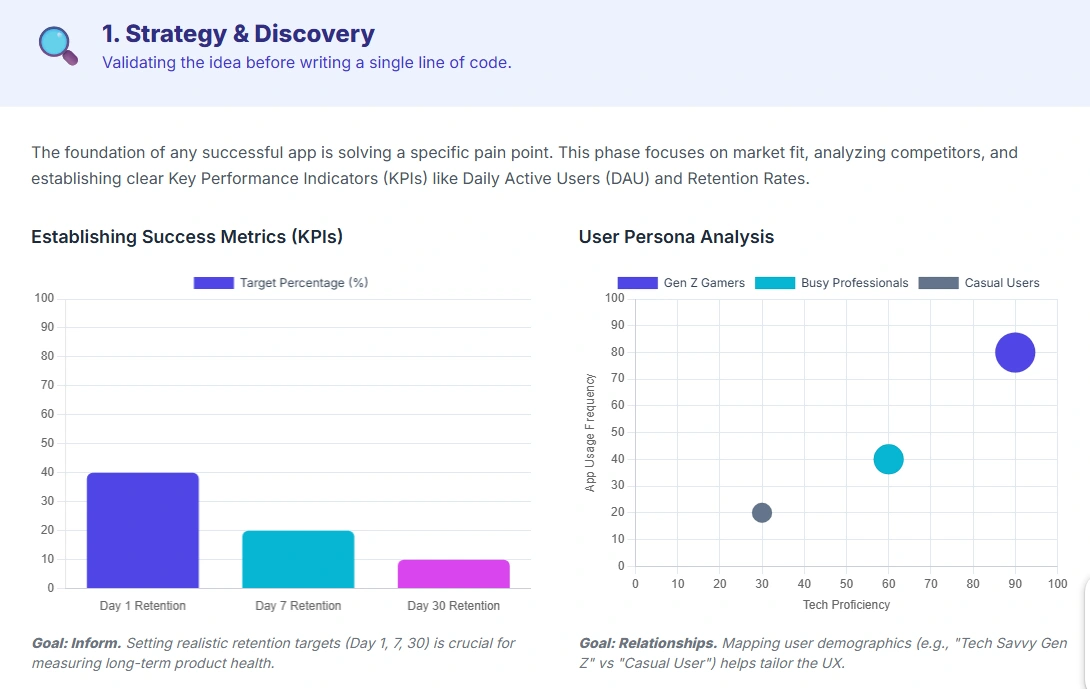
Do not start coding yet. If you hire developers before you have a strategy, you will burn through your budget changing things later.
Define Goals, Research & Roadmap
Identify business objectives and target audience
What defines success here? Is it 10,000 downloads, or is it reducing your internal team’s paperwork time by 50%? If you can’t measure it, you can’t build for it.
Market research and competitor analysis
Search the app stores for your idea. If you find competitors, that is actually good news it means there is a market. Download their apps. Read their one-star reviews. That is where the opportunity lies. What are users hating? Fix that in your version.
Decide monetization strategy
How will this make money? Be realistic.
- Freemium: Free to download, pay for features. This requires a massive user base to work.
- Subscriptions: Great for recurring revenue, but you must provide ongoing value (content, utility).
- Ads: Only viable if you expect millions of views.
- Paid: Hardest to sell. Users rarely pay upfront for an unknown app.
Budget, timeline, and software development approach
Let’s do the math on a standard scenario.
- In-house: You hire the team. High control, high fixed cost (salaries, benefits).
- Outsourcing: You hire an agency. Lower cost, but requires strict communication.
- Timeline: If you think it will take three months, budget for five. mobile app development process almost always encounters "unknown unknowns."
2. UI/UX Design & Wireframing
This phase is the blueprint. It is significantly cheaper to erase a line on a blueprint than to tear down a brick wall.
Conceptual Design & Prototyping
Sketching, wireframes, and mockups
Start with Wireframes. These are gray-scale skeletons of your app. They show where the buttons go, not what color they are. If the flow doesn't make sense in black and white, adding color won't fix it.
Information architecture and workflow planning
Map the user journey.
- Current State: User logs in, Gets lost in menu, Gives up.
- Ideal State: User logs in to Dashboard shows primary task then One tap to complete.
Crafting intuitive UX and accessible UI
Accessibility isn't just a legal requirement; it's market reach. If your text contrast is too low, or your buttons are too small for a thumb, you are alienating a massive chunk of users.
Prototypes for testing and refinement
Demand a "Clickable Prototype" from your designers. This looks like a real app but has no code behind it. Put this in front of actual humans. Watch them try to use it. If they struggle to find the "Checkout" button, you just saved thousands of dollars by fixing it now rather than after coding.
3. App Development
This is the execution phase where plans turn into functional software. In professional mobile development, this stage usually consumes about 60% of your total project timeline.
Development & Technology Stack
You have a critical choice to make regarding the frontend. This is the code that runs on the user's device.
- Cross-Platform (The Industry Standard): Technologies like Flutter (Google) and React Native (Meta) now dominate the market. They allow mobile application developers to write one codebase that works on both iOS and Android. This typically reduces development time by 30% to 40% compared to native builds.
- Native (The Specialist Choice): Writing separate code in Swift (for iOS) and Kotlin (for Android). You only need this if your app requires heavy processing power, like high-fidelity gaming or complex AR filters. For a standard business app, native mobile app development process often yields a poor ROI due to double maintenance costs.
The backend is the engine room. It handles the database, user authentication, and logic. A common mistake is underestimating backend costs. If you expect your user base to grow, you need a scalable architecture (like AWS or Google Cloud) rather than a simple server that crashes under traffic.
DevOps and Security
Security is not a feature you add later. It is a baseline requirement. With data breaches costing companies an average of $4.45 million according to IBM 2023 reports, you must integrate encryption from day one. This is where DevOps comes in. Automated systems (CI/CD pipelines) should check the code for security flaws every time a developer saves their work.
Platform Choice
Native, hybrid, cross-platform, or progressive web apps
If budget is your primary constraint, consider a Progressive Web App (PWA). This is essentially a website that behaves like an app. It is significantly cheaper to build. However, be aware of the limitations. PWAs cannot access certain hardware features like FaceID or background Bluetooth, and they do not have the same visibility in the App Store.
iOS vs Android: Revenue vs Reach
The data on this is clear.
- iOS: Apple users historically spend nearly 2.5 times more on in-app purchases than Android users. If your model relies on consumer spending, start here.
- Android: This platform holds over 70% of the global market share. If your goal is mass adoption or ad revenue, you cannot ignore Android.
4. Testing, Deployment & Launch
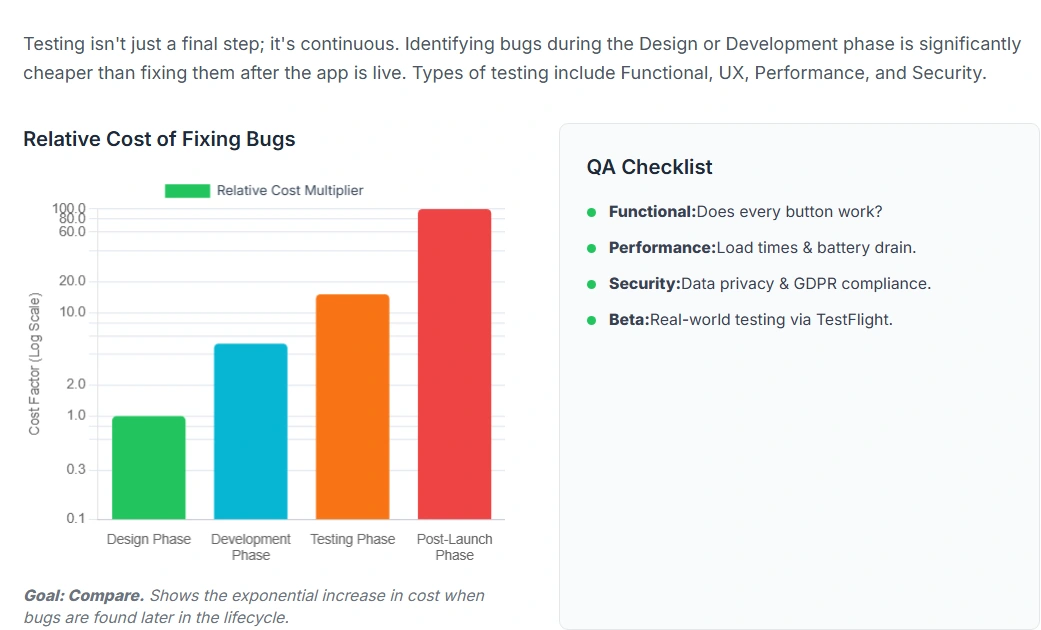
There is an old software engineering maxim known as the 1-10-100 Rule. It states that if a bug costs $1 to fix in design, it costs $10 to fix in development, and $100 to fix after launch. Mobile application testing is your primary defense against that $100 cost.
Quality Assurance & Pre-Launch
Unit, integration, and user acceptance testing
Testing is not just "clicking around." It requires a structured approach.
- Unit Testing: Developers test individual functions to ensure the math works.
- Integration Testing: You verify that different parts of the app talk to each other. For example, does the payment gateway actually update the order history database?
- User Acceptance Testing (UAT): This is the final gate. Real users (or client stakeholders) test the app to ensure it solves the business problem.
Device & OS Fragmentation
This is the hardest part of Android mobile app development process. There are thousands of distinct Android devices with different screen sizes and processor speeds.
- The Reality: Your app might fly on a Pixel 8 but crash on a three-year-old Samsung A-series. Professional teams use cloud testing farms (services that allow you to test on real devices remotely) to check performance across the top 20 most popular devices in your target market.
App Store Submission
Getting into the App Store is not automatic. Apple reviews are strict.
- Rejection Risks: According to historical data, roughly 40% of apps are rejected on their first submission. Common reasons include incomplete information, buggy performance, or asking for too much user data.
- The Launch Buffer: accurate planning requires you to set your launch date at least two weeks after you submit the app. This gives you a buffer to fix the inevitable rejection issues without missing your marketing deadline.
5. Post-Launch Support & Optimization
Launch day is not the finish line. It is arguably the starting line. A common budgetary mistake is treating app development as a one-time expense rather than an ongoing operational cost.
Maintenance & Continuous Improvement
The Cost of "Keeping the Lights On"
You need to budget for maintenance immediately. Industry consensus suggests that annual maintenance costs typically run between 15% and 20% of the original development price.
- Why? Apple and Google update their operating systems every year. If iOS 19 changes how push notifications work and you do not update your code, your app breaks. Third-party services (like maps or payment gateways) also update their APIs regularly. If you do not maintain the connection, features stop working.
Monitoring App Performance and Analytics
You cannot improve what you do not measure. However, vanity metrics like "Total Downloads" are misleading. You need to track Active Users (DAU/MAU) and Churn Rate.
- The Churn Reality: If 100 people download your app and 95 of them delete it within a week, you do not need more marketing. You need a better product. Analytics tools like Firebase or Mixpanel reveal exactly where users drop off.
Updates, Bug Fixes, and Feature Iterations
The first version of your app (MVP) is never perfect. Users will find bugs that your testers missed. A professional roadmap includes a planned update cycle (e.g., every two weeks) to address these issues and introduce new features based on user feedback.
6. Industry-Specific Solutions & Trends
Mobile development is not generic. The requirements for a healthcare app are radically different from an e-commerce platform.
Applications & Emerging Tech
Industry-Specific Requirements
- Healthcare: Compliance is the only metric that matters here. If you are building for the US, you need HIPAA compliance. In Europe, it is GDPR. This requires specific infrastructure choices, such as encrypted databases that audit every single data access attempt.
- Fintech: Trust is the currency. These apps often require biometric authentication (FaceID/Fingerprint) and two-factor authentication (2FA) by default. The development focus here is heavily weighted toward security architecture rather than flashy animations.
- E-commerce: Speed equals revenue. Amazon found that every 100ms of latency cost them 1% in sales. For retail apps, the engineering priority is minimizing load times and simplifying the checkout flow to a single tap.
Don't miss this : E-commerce Mobile App Design
Trends: AI, 5G, and Cloud-Native
It is 2025, and the buzzwords are flying. Here is what is actually useful.
- AI and Machine Learning: Ignore the hype about "generative AI" unless you have a specific use case. The real value is in personalization. Netflix uses ML to predict what you want to watch. Your app can use it to predict what a user wants to buy. This increases conversion rates.
- 5G and Edge Computing: This allows apps to process data faster. It is vital for apps that use Augmented Reality (AR) or real-time video streaming, as it reduces the lag that makes users nauseous or frustrated.
- Cloud-Native: Building "serverless" applications allows you to pay only for the computing power you use. This is a massive cost-saver for startups compared to renting fixed server space that sits idle half the time.
7. Choosing the Right Development Partner
Who you hire dictates whether you end up with a revenue-generating asset or a folder of useless code. This is not a transaction; it is a long-term technical marriage.
Evaluating Companies & Avoiding Mistakes
Portfolio, client reviews, technical expertise, industry experience
Do not just look at the screenshots in a portfolio of the mobile app development company. Look for complexity.
- The "Pretty Picture" Trap: Anyone can design a beautiful login screen. You need to verify if they have built complex backends. Ask for a case study where they handled high traffic or sensitive data. If they have only built brochure apps, they are not ready for your enterprise solution.
Questions to ask potential developers
During the interview, ask the hard questions that bad agencies hate:
- "What happens if we find a critical bug two weeks after launch?" (The answer should be an immediate fix under warranty, not a new bill.)
- "Can you show me the code structure of a previous project?" (Even if you cannot read code, their willingness to share shows transparency.)
- "How do you handle scope creep?" (You want a partner who pushes back when you ask for too many features, not a "Yes Man" who agrees to everything and blows the timeline.)
Common mistakes: poor UI, too many features, skipping MVP
The biggest mistake clients make is trying to build "Version 10" immediately.
- The MVP Strategy: Build the Minimum Viable Product. Focus on the one core feature that solves the problem. If you try to launch with 50 features, you will run out of money before you finish debugging. Get the core version to market, get feedback, and then iterate.
Value of partnering with a local agency
There is a massive price difference between local and offshore talent, but there is also a communication cost.
- The Trade-off: Offshore development is cheaper per hour. However, if you spend 10 hours a week fixing miscommunications due to language barriers or time zone lags, that savings evaporates. For complex, custom logic, a local or near-shore partner often costs less in the long run because they get it right the first time.
mobile app building is not a sprint. It is a marathon that requires discipline.
To recap the mobile app development process:
- Strategy: Measure twice, cut once. Define your goals before you hire anyone.
- Design: Solve the user's problem on paper (or Figma) before writing code.
- Development: Choose the right tech stack (Native vs. Cross-Platform) for your budget.
- Testing: in mobile application testing we break the app before your users do.
- Launch: Plan for rejection and have a maintenance budget ready.
The difference between a failed project (in terms of app creation process) and a market leader is rarely the idea itself. It is the execution. If you respect the process, invest in proper planning, and choose a partner who tells you the truth rather than what you want to hear, you can build something that truly adds value to your business.